 Setup
SetupSets how the instrument should power on and activate certain presets.
|
GUI Location |
System Menu (triple bar icon) > Settings (gear icon) > Power On/Preset |
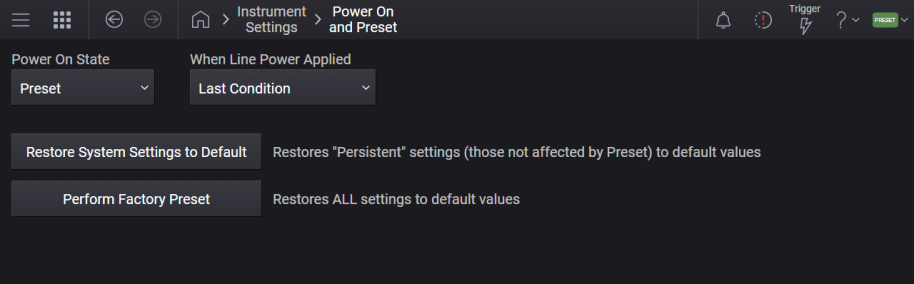
Enables you to select whether the instrument powers up in a default state or some other state.
PRESet: Instrument powers up in the default preset state.
USER: Instrument powers up in the user-defined power-on state.
LAST: Instrument powers up in the state it was in when last shut down.
|
GUI Location |
System Menu (triple bar icon) > Settings (gear icon) > Power On/Preset > Power On State |
|
SCPI Command |
:SYSTem:PON:TYPE PRESet|USER|LAST :SYSTem:PON:TYPE? |
|
SCPI Example |
:SYST:PON:TYPE PRES :SYST:PON:TYPE USER :SYST:PON:TYPE LAST |
|
Preset |
This is unaffected by a Preset but is set to Preset on a "Restore System Settings to Default Values". |
|
State Saved |
Persistent, survives preset and power cycle but not saved in the instrument state. |
This setting determines the action the instrument takes when line power is applied or restored. (For other models, this operation is controlled by settings in the BIOS.)
The choices are:
Last Condition (default) – resumes the instrument in the condition it was in when the line power was disconnected (On if the instrument was on, Off if it was off ).
On – always boots the instrument when line power is applied.
Off – instrument does not boot up when line power is applied (pressing the front panel button is required to boot the instrument).
It is not advised to interrupt line power while the instrument is running by removing the line cord, or switching off a power strip or equipment rack main circuit. The instrument should be shut down gracefully via the front panel power button or :SYSTem:PDOWn SCPI command.
|
GUI Location |
System Menu (triple bar icon) > Settings (gear icon) > Power On/Preset >When Line Power Applied |
|
SCPI Command |
:SYSTem:LPRestored:STATe LAST|ON|OFF :SYSTem:LPRestored:STATe? |
|
SCPI Example |
:SYST:LPR:STAT ON |
|
Preset |
This is unaffected by a Preset but is set to LAST on a "Restore System Settings to Default Values". |
|
State Saved |
Persistent, survives preset and power cycle but not saved in the instrument state. |
Sets the states that are not affected by signal generator power–on, Preset, or *RST to their factory default settings.
Most settings are affected by Preset, but there are some settings that are unaffected. These are called persistent variables. The system and each application will list its persistent variables. To reset these, select Restore System Settings to Default.
When this control is selected, the following message appears:
"This will reset all persistent variables to their default state. This action cannot be undone. Do you want to proceed?"
The message provides an and button to let you affirm or cancel the operation.
|
GUI Location |
System Menu (triple bar icon) > Settings (gear icon) > Power On State > Restore System Settings to Default |
|
SCPI Command |
:SYSTem:PRESet:PERSistent |
|
SCPI Example |
:SYST:PRES:PERS |
Sets all states of the signal generator back to their factory default settings, including states that are not normally affected by signal generator power–on, Preset, or *RST.
When selected, the following message appears:
"This will reset all variables (including System variables) to their default state. This action cannot be undone. Do you want to proceed?"
The message provides an and button to let you affirm or cancel the operation.
|
GUI Location |
System Menu (triple bar icon) > Settings (gear icon) > Power On/Preset > Perform Factory Preset |
|
SCPI Command |
:SYSTem:PRESet:ALL |
|
SCPI Example |
:SYST:PRES:ALL |
|
Notes |
No confirmation is required when the SCPI command is sent |
Defines whether *RST performs a factory preset or the user preset saved in memory.
NORMal: *RST restores factory-defined default values.
USER: *RST restores the user-defined preset state saved in the instrument. See Save User Preset.
|
SCPI Command |
:SYSTem:RST:CONFigure NORMal|USER :SYSTem:RST:CONFigure? |
|
SCPI Example |
:SYST:RST:CONF USER :SYST:RST:CONF? |
|
Dependencies |
Applies only when SCPI Backwards Compatibility Mode is E82x7D. Otherwise, applies NORM, regardless of value. See SCPI Backwards Compatibility Mode. |
| Preset | This setting is unaffected by Preset. It is reset to NORMal on Restore System Settings to Default Values. |
| Range | Normal|User |
| State Saved | Persistent, survives preset and power cycle but not saved in the instrument state. |
| Backwards Compatibility SCPI |
N51xxB :SYSTem:RST:CONFigure |